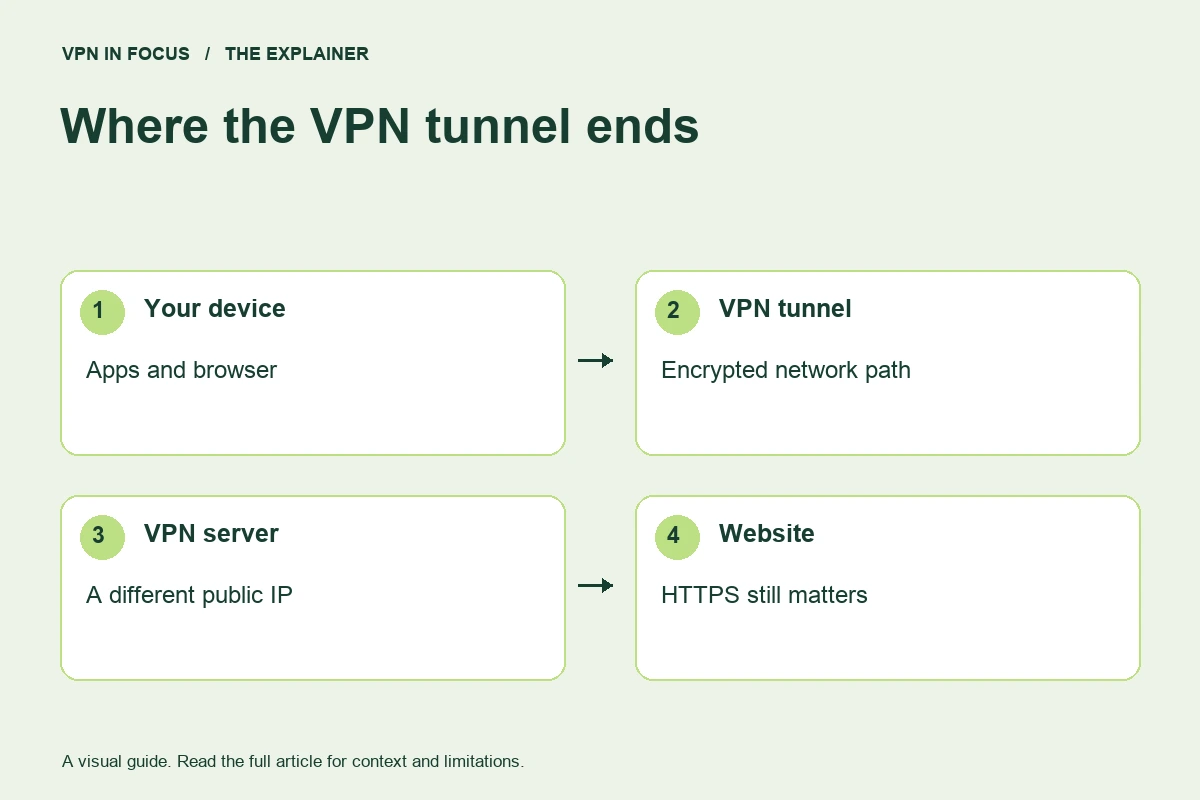
A VPN creates an encrypted connection between your device and a VPN server. Traffic routed through that connection reaches websites from the server’s IP address. It can reduce what the local network learns about your traffic, but it does not make you anonymous or protect every part of your online life.
Think of a VPN as a change to the route your traffic takes. Without a commercial VPN, your device sends traffic through your local network and internet provider toward the destination. With a VPN, the device first sends the routed traffic through an encrypted tunnel to the VPN server. The server then forwards it onward.
That route change can be useful, but it also changes who you must trust. The VPN operator handles the traffic leaving its service. Choosing a provider is therefore a trust decision as well as a software decision. A polished app alone cannot answer all the relevant questions.
How the connection works
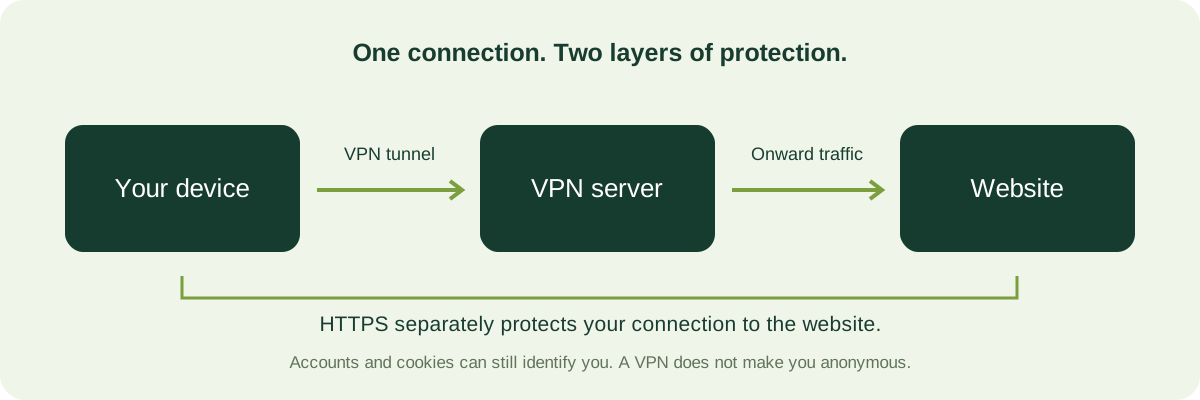
The app creates a network interface and applies routing rules. Traffic included in those rules goes to the VPN server through the tunnel. Some setups route almost everything; others exclude particular apps or destinations. Those exclusions are often called split tunneling. They are useful in some situations, but excluded traffic does not gain the tunnel’s protection.
At the VPN server, the outer tunnel ends. Your connection to a website may still be protected by HTTPS, which is a separate layer. The distinction matters: a VPN is not a replacement for a secure website connection, and a padlock is not a replacement for evaluating the VPN provider.
What a VPN can help with
A correctly configured VPN can make it harder for the local network to observe the destinations of traffic carried inside its tunnel. It can also replace your usual public IP address with a VPN-server address as seen by a website. On an unfamiliar network, that may be a useful addition to ordinary encrypted web browsing.
It can also provide a consistent connection setup across networks. Instead of treating every hotel or cafe as a special case, you can use a known app configuration and check that the tunnel is established. Consistency is helpful only when you understand the settings and know how to recover from a failure.
A VPN can change the apparent network location associated with your IP address. That does not change every location signal a service may receive. Account details, payment information, GPS permission, and other signals can still be relevant. A map pin in the app is not a universal location switch.
What it does not solve
If you sign in to an account, the service can associate actions with that account. Cookies and browser characteristics can also connect visits. Changing the route does not erase those identifiers. Private-browsing mode and a VPN address different parts of the picture, and neither automatically makes you anonymous.
A VPN also does not remove malware from a device or make a malicious website trustworthy. If you enter a password into a convincing phishing page, encrypting the delivery does not change who receives it. Updates, password management, and stronger account authentication remain separate tasks.
The local network can generally still tell that your device is communicating with a VPN endpoint and observe timing or volume characteristics. A VPN is not a promise that all traces of activity disappear. More demanding threat models require careful analysis beyond an everyday buying guide.
When paying for a VPN makes sense
Start with the problem. If your concern is visibility on networks you do not control, a VPN may be one useful tool. If the main problem is reused passwords or an outdated operating system, those issues deserve direct attention first. Buying a subscription does not compensate for leaving them unresolved.
Next, identify the devices involved. The native app is often the simplest route for a phone or laptop. A router setup can cover more traffic but may introduce compatibility, performance, and maintenance questions. A work VPN may already be required for company resources and should not be changed casually.
Finally, decide how much commitment is reasonable. A free plan or short paid term may help you learn what you need. A long promotion only makes sense if the service fits your use and the renewal conditions are understood. Our VPN buying guide offers a shortlist organized by those questions.
Video: the route in under a minute
A VPN tunnel, explained visually
A short, silent explainer with captions. Press play when you are ready.
Read the video transcript
Your device starts a connection. The VPN app encrypts routed traffic and sends it through a tunnel to a VPN server. The local network can see the connection to that server, but not the contents protected by the tunnel. The server forwards traffic to the destination. HTTPS is a separate layer protecting the connection to a website. Accounts and cookies can still identify you. A VPN changes your network path; it does not make you anonymous.
Five settings worth understanding
Automatic connection: decide when the app should connect and whether it distinguishes trusted networks. A rule that sounds convenient should still be tested during the transitions you actually make.
Kill switch: this can block traffic when the tunnel is unavailable, but the exact behavior varies. Read whether it covers an unexpected failure, manual disconnection, startup, or all of those cases. See our kill-switch guide for a careful test routine.
Protocol: start with the app’s recommended setting. Change it to investigate a concrete problem rather than assuming that a less familiar name is automatically better.
Split tunneling: review which apps or destinations bypass the tunnel. A useful exception is still an exception and should not be forgotten.
Account security: protect the VPN account and its recovery method. Losing account access can disrupt both the connection and subscription management.
Common questions
Does HTTPS mean a VPN is useless?
No. HTTPS and a VPN protect different layers and reveal different metadata. HTTPS remains essential; whether a VPN adds useful protection depends on the network visibility you want to reduce.
Will a VPN always slow my internet?
It adds a route and processing work, so overhead is possible. The result depends on distance, congestion, routing, and device capacity. Do not infer a fixed speed change for every connection.
Can I leave a VPN on all the time?
You can choose that setup if the app supports it and it works with your needs. Check network transitions, local-device access, battery impact, and any work policies before relying on it.
Sources & further reading
Provider statements describe advertised capabilities. They are not independent performance measurements. Sources were consulted while preparing this article on September 24, 2026.
About the author

Maya’s section makes the mechanics of online privacy easier to understand. Topics include encrypted connections, public Wi-Fi, browser privacy, and small settings changes that readers can check on their own devices.
Maya Bennett is a fictional contributor profile created for this publication. This profile does not represent a verified individual or professional credentials. Read our editorial policy.