The shortlist: best VPNs for Mac
The best VPN for a Mac is the one that fits the way macOS manages your connection. A long Windows feature list is not enough. Check the current Mac app, its installation route, the supported operating-system version and the specific controls you need. A MacBook used between home and cafés has different priorities from a desktop Mac that stays on one network.
Our starting shortlist is Proton VPN for its free entry point and open-source apps, NordVPN for its range of everyday connection features, and Surfshark for households that want to cover many devices. This is a fit-based selection, not a measured speed ranking. All four deserve a device-specific evaluation before a long commitment.

Proton VPN
An accessible free starting point, with deeper privacy tools on paid plans.
- A usable free plan without a data cap
- Open-source apps and published audits

TotalVPN
A straightforward VPN with useful routing controls; check the exact app and renewal terms.
- Guided desktop, mobile and Apple TV setup
- Split-tunneling options on supported apps

NordVPN
A versatile starting point for everyday VPN use.
- Ten simultaneous connections
- NordLynx and specialty connection modes


Surfshark
A flexible subscription for a household full of devices.
- Unlimited simultaneous connections
- Customizable MultiHop routes
TotalVPN: another option to compare
TotalVPN’s current Mac guide describes separate approval steps for WireGuard and Hydra network extensions. Compare the app on your own macOS version and recheck behavior after sleep. Its split-tunneling feature list should not be assumed to match Windows or Android.
Confirm the device allowance, renewal price and refund process for the offer you choose. Read the detailed TotalVPN review for platform differences and purchase conditions.
What matters most for Mac
Look first at reconnection after sleep. Closing a MacBook lid, moving to another network and reopening an application is a normal daily workflow. The VPN should resume in a way you understand, and your protection settings should behave predictably while it reconnects. A connected icon from yesterday is not a useful substitute for checking the current status.
Next, inspect the kill switch and local-network controls. A setting that blocks traffic outside the VPN may affect a printer or shared storage. Decide which local services you need, then make a narrow exception only where the app supports it. Broadly disabling protection to recover a printer can change much more than the printer connection.
Finally, check the exact split-tunneling implementation. macOS networking permissions and app designs differ from Windows. If you need to exclude a particular app or website, verify that precise action in the current Mac guide. Do not buy solely because a general product page says “split tunneling.”
Compare our Mac shortlist
| What matters | Proton VPNRead review → | NordVPNRead review → | SurfsharkRead review → |
|---|---|---|---|
| Best fit | Transparency & a free plan | Everyday features | Multi-device households |
| Simultaneous devices | 10 paid / 1 free | 10 | Unlimited |
| Free plan | Yes — no data cap; restricted locations and features | No permanent free plan | No permanent free plan |
| Connection protocols | WireGuard, OpenVPN, Stealth; platform availability varies | NordLynx, OpenVPN; NordWhisper on supported apps | WireGuard, OpenVPN; IKEv2 on supported apps |
| Multi-hop approach | Secure Core (paid) | Double VPN | Dynamic MultiHop |
| Blocking tools | NetShield (paid) | Threat Protection; features vary by plan and platform | CleanWeb; additional security products depend on plan |
| Port forwarding | Paid desktop apps; supported P2P servers | Not offered | Not offered |
| Refund policy | 30 days on eligible paid purchases; check current terms | 30 days; eligibility and purchase-channel terms apply | 30 days; eligibility and purchase-channel terms apply |
| Platform coverage | Windows, macOS, Linux, Android, iOS; supported TV apps and routers | Windows, macOS, Linux, Android, iOS; supported TV apps and routers | Windows, macOS, Linux, Android, iOS; supported TV apps and routers |
| Operating jurisdiction | Switzerland | Panama | Netherlands |
| Code transparency | Open-source VPN apps | Selected components; not all apps | Selected components; not all apps |
| Support options | Help center and support requests; live-chat availability varies | Live chat and help center | Live chat and help center |
| Current plans | View plans | View plans | View plans |
Proton VPN: a low-commitment starting point
Proton Free lets you establish a basic connection without paying for a long plan. Its restrictions make it a different product from the paid streaming and advanced-feature experience. On a paid plan, current documentation includes port forwarding for the macOS graphical app, which is a meaningful option for authorized applications that need incoming connectivity. Confirm your app version and supported server configuration.
NordVPN: a broad everyday toolkit
NordVPN is worth comparing when ten simultaneous connections are enough for your household. Its connection protocols and specialty modes provide room to explore different needs. The key Mac question is which controls appear in your installation and plan. Check the download source, security permissions and current feature guide before assuming parity with the Windows app.
Surfshark: one account across the household
Surfshark’s unlimited device allowance is useful if the Mac is only one part of a larger setup. Its Bypasser functionality has platform-specific controls; verify the current Mac implementation for the exception you need. Start with a standard connection and add selective routing only after ordinary browsing, calls and local resources work correctly.
Set it up and check the everyday experience
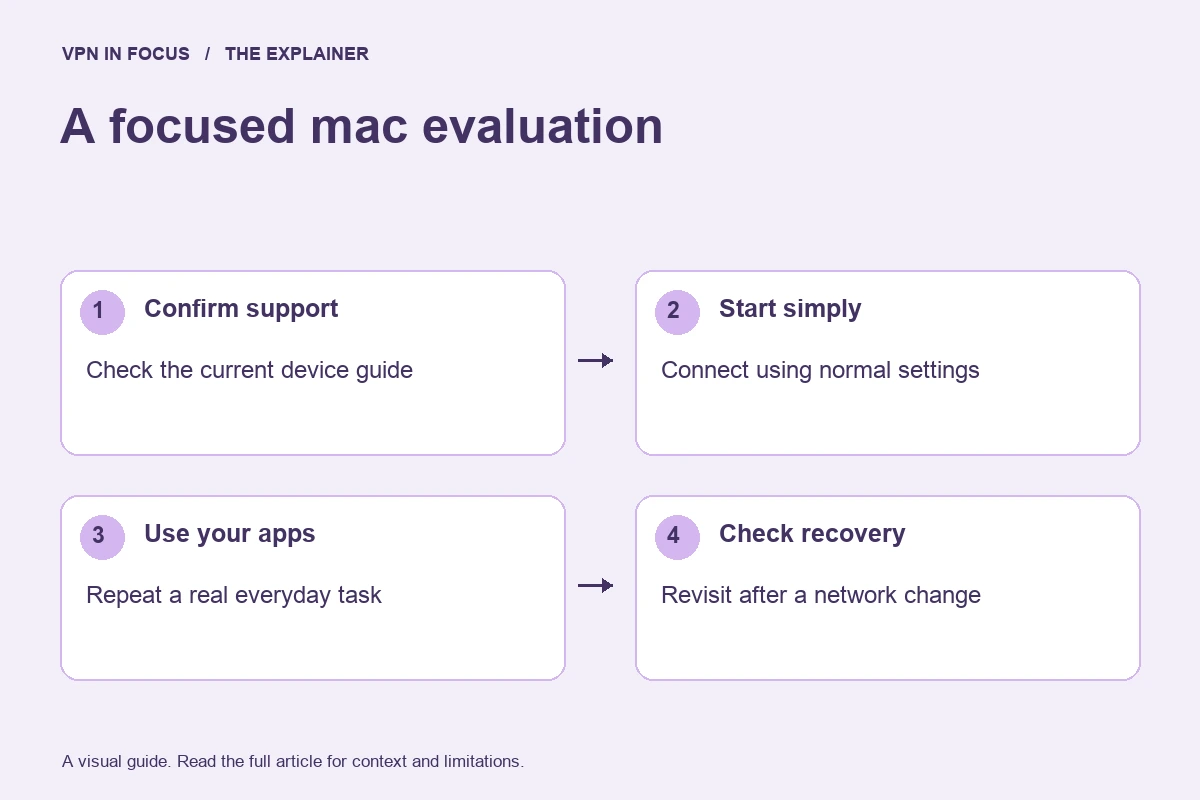
Download from the provider’s official route or verified App Store listing. Check the supported macOS version and whether your organization manages the device. Install, sign in and approve the requested VPN or network-extension permission only for the app you intended to install. Connect to a nearby server before enabling optional features.
Open an ordinary HTTPS site, make a short call and check access to a local device if you use one. Then sleep and wake the MacBook and repeat the check. Move between Wi-Fi networks if that is part of your normal routine. Keep another VPN disconnected during this evaluation so that competing network filters do not confuse the result.
Important limits and common mistakes
iCloud Private Relay is a separate service with a different scope; it should not be treated as a full-device VPN replacement. If a website behaves unexpectedly, understand which privacy services are active before changing several settings together. Browser extensions also normally affect browser traffic rather than every app on the Mac.
For a work-managed Mac, follow your organization’s network rules. A personal VPN does not provide access to the company’s internal resources and can conflict with a work VPN or endpoint policy. Ask the administrator which configuration is supported before changing managed networking.
How we chose this shortlist
These selections match documented features to the use case: platform support, device allowance, routing controls and subscription flexibility. They are not rankings based on an unpublished laboratory test. Provider documentation was checked on September 24, 2026; availability can change with app versions and plans.
Use the full reviews to inspect the sources and compare trade-offs. Before a long subscription, evaluate your actual setup during the applicable trial or refund period. Record the total upfront charge and renewal terms rather than choosing only by an advertised monthly equivalent.
Frequently asked questions
Do Mac users still benefit from a VPN?
A Mac’s security features do not replace a VPN’s network-routing function. Whether you need one depends on your network, privacy goals and applications.
Can I use the same subscription on my iPhone?
Usually, if the plan supports both platforms and you remain within its simultaneous-device allowance. The two apps may have different features.
Is a browser extension enough on a Mac?
Only if its narrower browser scope matches your need. Other applications generally require the full-device app or another supported VPN setup.
Sources & further reading
Provider statements describe advertised capabilities. They are not independent performance measurements. Sources were consulted while preparing this article on September 24, 2026.
About the author

Alex’s coverage starts with a simple question: what do you actually need a VPN to do? This profile brings together buying guides and service comparisons, with a focus on subscription terms, device compatibility, and useful everyday features.
Alex Morgan is a fictional contributor profile created for this publication. This profile does not represent a verified individual or professional credentials. Read our editorial policy.