The shortlist: best VPNs for Torrenting
Torrenting is a file-distribution method, and a VPN can change the network address visible to peers while protecting the path to the VPN server. It does not establish whether you have permission to share a particular file. This guide focuses on authorized downloads, such as open-source software or material you are entitled to distribute.
Proton VPN and Private Internet Access are the most relevant starting comparisons when incoming port forwarding matters. NordVPN is a simpler alternative when you do not need that capability. The right choice depends on your operating system, the application’s network controls and the availability of an appropriate server route.

Proton VPN
An accessible free starting point, with deeper privacy tools on paid plans.
- A usable free plan without a data cap
- Open-source apps and published audits

TotalVPN
A straightforward VPN with useful routing controls; check the exact app and renewal terms.
- Guided desktop, mobile and Apple TV setup
- Split-tunneling options on supported apps

Private Internet Access
A configurable VPN for people who want more control over routing.
- Unlimited simultaneous connections
- Port forwarding in supported locations


NordVPN
A versatile starting point for everyday VPN use.
- Ten simultaneous connections
- NordLynx and specialty connection modes
TotalVPN: another option to compare
TotalVPN is included as an everyday VPN comparison, not as a forwarding recommendation. Incoming port forwarding was not established in the cited documentation. If an externally reachable peer-to-peer client is essential, prioritize a service with explicit support, such as the paid Proton VPN, PIA or PrivateVPN workflows.
Confirm the device allowance, renewal price and refund process for the offer you choose. Read the detailed TotalVPN review for platform differences and purchase conditions.
What matters most for Torrenting
A kill switch and application binding solve related but different problems. The kill switch controls traffic when the tunnel is unavailable. Binding a torrent client to a VPN interface, where supported by that client, limits the interface it uses. Configure these carefully and check what happens after the interface or assigned address changes.
Port forwarding allows an outside peer to initiate a connection through a supported VPN exit. It can improve reachability in some P2P situations, but it does not guarantee faster downloads. The availability and quality of other peers still matter. A forwarded port must match the intended application, and a newly assigned port may need to be updated after reconnecting.
Choose a suitable location that supports the required feature. Do not pick a very distant forwarding-capable server and then compare its latency with a nearby ordinary server as if the routes were equivalent. Keep the connection design understandable before optimizing it.
Compare our Torrenting shortlist
| What matters | Proton VPNRead review → | Private Internet AccessRead review → | NordVPNRead review → |
|---|---|---|---|
| Best fit | Transparency & a free plan | Advanced connection controls | Everyday features |
| Simultaneous devices | 10 paid / 1 free | Unlimited | 10 |
| Free plan | Yes — no data cap; restricted locations and features | No permanent free plan | No permanent free plan |
| Connection protocols | WireGuard, OpenVPN, Stealth; platform availability varies | WireGuard and OpenVPN; other options vary by app | NordLynx, OpenVPN; NordWhisper on supported apps |
| Multi-hop approach | Secure Core (paid) | VPN with proxy routing on supported desktop apps | Double VPN |
| Blocking tools | NetShield (paid) | MACE; availability depends on app and distribution | Threat Protection; features vary by plan and platform |
| Port forwarding | Paid desktop apps; supported P2P servers | Supported server locations; not every region | Not offered |
| Refund policy | 30 days on eligible paid purchases; check current terms | 30 days for eligible purchases; exclusions apply | 30 days; eligibility and purchase-channel terms apply |
| Platform coverage | Windows, macOS, Linux, Android, iOS; supported TV apps and routers | Windows, macOS, Linux, Android, iOS; supported routers and browser extensions | Windows, macOS, Linux, Android, iOS; supported TV apps and routers |
| Operating jurisdiction | Switzerland | United States | Panama |
| Code transparency | Open-source VPN apps | Open-source VPN apps | Selected components; not all apps |
| Support options | Help center and support requests; live-chat availability varies | 24/7 customer support and help center | Live chat and help center |
| Current plans | View plans | View plans | View plans |
Proton VPN: supported paid desktop forwarding
Proton’s current guide documents port forwarding in paid Windows, macOS and Linux graphical apps. That makes it a useful cross-desktop candidate. Select a supported P2P configuration and follow the current instructions. Proton Free should not be treated as the same product for this use case.
Private Internet Access: configurable incoming connectivity
PIA offers forwarding in supported locations and detailed desktop connection controls. This is useful for users comfortable managing a port and application settings. Confirm the region supports forwarding, and distinguish PIA’s proxy-routing feature from a two-VPN-server tunnel.
NordVPN: a connection without incoming forwarding
NordVPN is worth considering when your authorized P2P application works without incoming port forwarding. Its absence is a concrete limitation if forwarding is part of your workflow. Do not expect a router port rule to create a forwarded port through the remote VPN exit.
Set it up and check the everyday experience
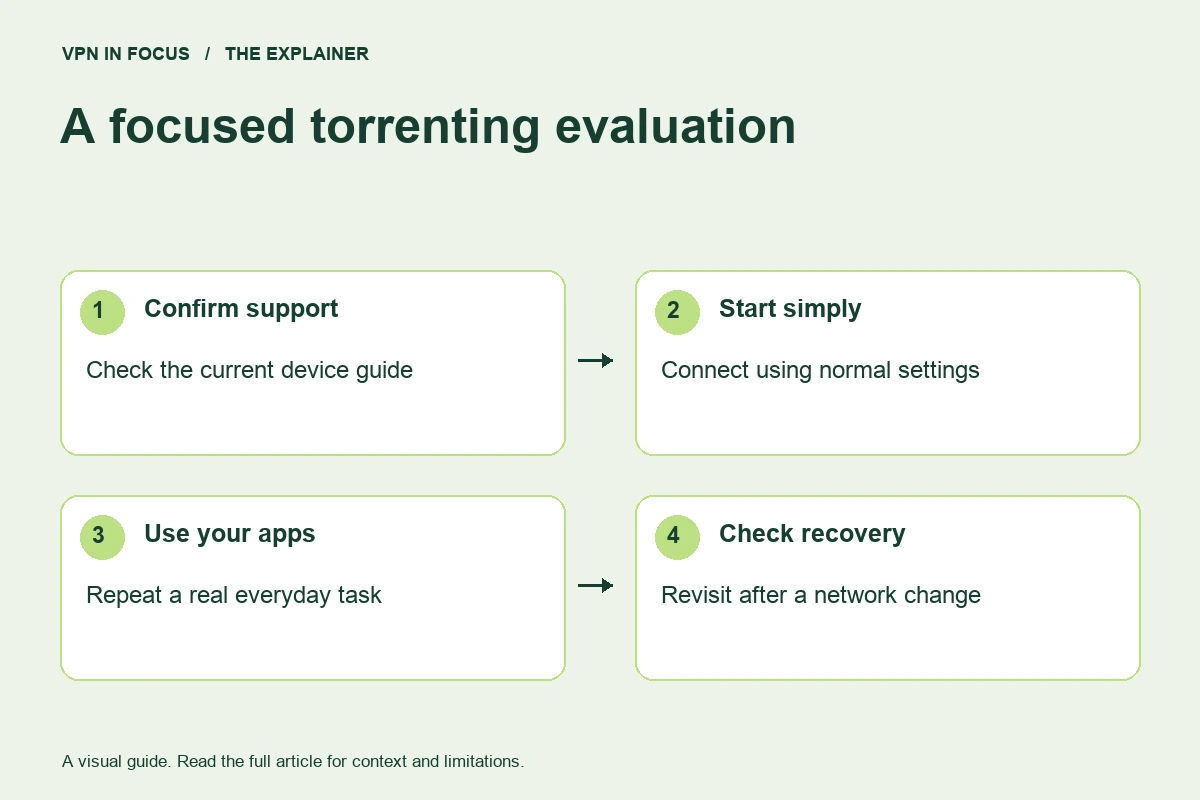
Install the official VPN app and verify a normal connection first. Choose a supported P2P route and enable the relevant disconnection protection. If using port forwarding, follow the provider’s guide and enter the assigned value in the intended application. If the client supports interface binding, read its own documentation before configuring it.
Use an authorized test file and inspect the application’s network status. Stop the task before deliberately testing a disconnect if you are unsure how the client behaves. Recheck after a server change, app update or reboot. A saved configuration can become outdated when the operating system renames a network interface.
Important limits and common mistakes
A SOCKS proxy alone is not the same as a full encrypted VPN tunnel. It can change an application’s route while leaving other traffic outside that path. Likewise, an IP-check page in a browser does not prove which interface a separate torrent application uses.
Do not disable a firewall or open broad port ranges as a quick performance fix. Keep the exposure limited to the feature and application you intend to use. If a download is slow, consider peer availability, storage performance and the ordinary internet connection before changing multiple security controls.
How we chose this shortlist
These selections match documented features to the use case: platform support, device allowance, routing controls and subscription flexibility. They are not rankings based on an unpublished laboratory test. Provider documentation was checked on September 24, 2026; availability can change with app versions and plans.
Use the full reviews to inspect the sources and compare trade-offs. Before a long subscription, evaluate your actual setup during the applicable trial or refund period. Record the total upfront charge and renewal terms rather than choosing only by an advertised monthly equivalent.
Frequently asked questions
Does a VPN make any torrent legal?
No. Permission to download or distribute a file is independent of the network tool used. Follow applicable law and the rights attached to the material.
Do I always need port forwarding?
No. Some P2P workflows work without it. It is relevant when incoming reachability is a requirement, and the benefit depends on the wider peer network.
Is a browser IP check enough?
No. It describes the browser’s route. A separate application can use a different interface or an intentional routing exception.
Sources & further reading
Provider statements describe advertised capabilities. They are not independent performance measurements. Sources were consulted while preparing this article on September 24, 2026.
About the author

Alex’s coverage starts with a simple question: what do you actually need a VPN to do? This profile brings together buying guides and service comparisons, with a focus on subscription terms, device compatibility, and useful everyday features.
Alex Morgan is a fictional contributor profile created for this publication. This profile does not represent a verified individual or professional credentials. Read our editorial policy.