The shortlist: best VPNs for iPhone
A useful iPhone VPN needs to fit a mobile routine: brief sessions, changing Wi-Fi networks and frequent switches to cellular data. Desktop screenshots tell you little about those transitions. Start with the current iOS app, a clear connection status and a plan you can evaluate without assuming every desktop setting exists on the phone.
Proton VPN is our starting point for a permanent free connection with documented restrictions. ExpressVPN belongs on the shortlist for its Lightway-based connection approach. Surfshark is useful when the same subscription must cover an entire household. The right choice depends on your routine and the exact features available in the current iOS release.

Proton VPN
An accessible free starting point, with deeper privacy tools on paid plans.
- A usable free plan without a data cap
- Open-source apps and published audits

TotalVPN
A straightforward VPN with useful routing controls; check the exact app and renewal terms.
- Guided desktop, mobile and Apple TV setup
- Split-tunneling options on supported apps

ExpressVPN
A streamlined connection experience built around Lightway.
- Lightway available across major platforms
- Dedicated Aircove router option


Surfshark
A flexible subscription for a household full of devices.
- Unlimited simultaneous connections
- Customizable MultiHop routes
TotalVPN: another option to compare
TotalVPN offers an iOS setup path with a system VPN configuration. Verify reconnection after Wi-Fi and cellular changes, and check which controls are actually present in the current iPhone app. Desktop routing features do not automatically carry over to iOS.
Confirm the device allowance, renewal price and refund process for the offer you choose. Read the detailed TotalVPN review for platform differences and purchase conditions.
What matters most for iPhone
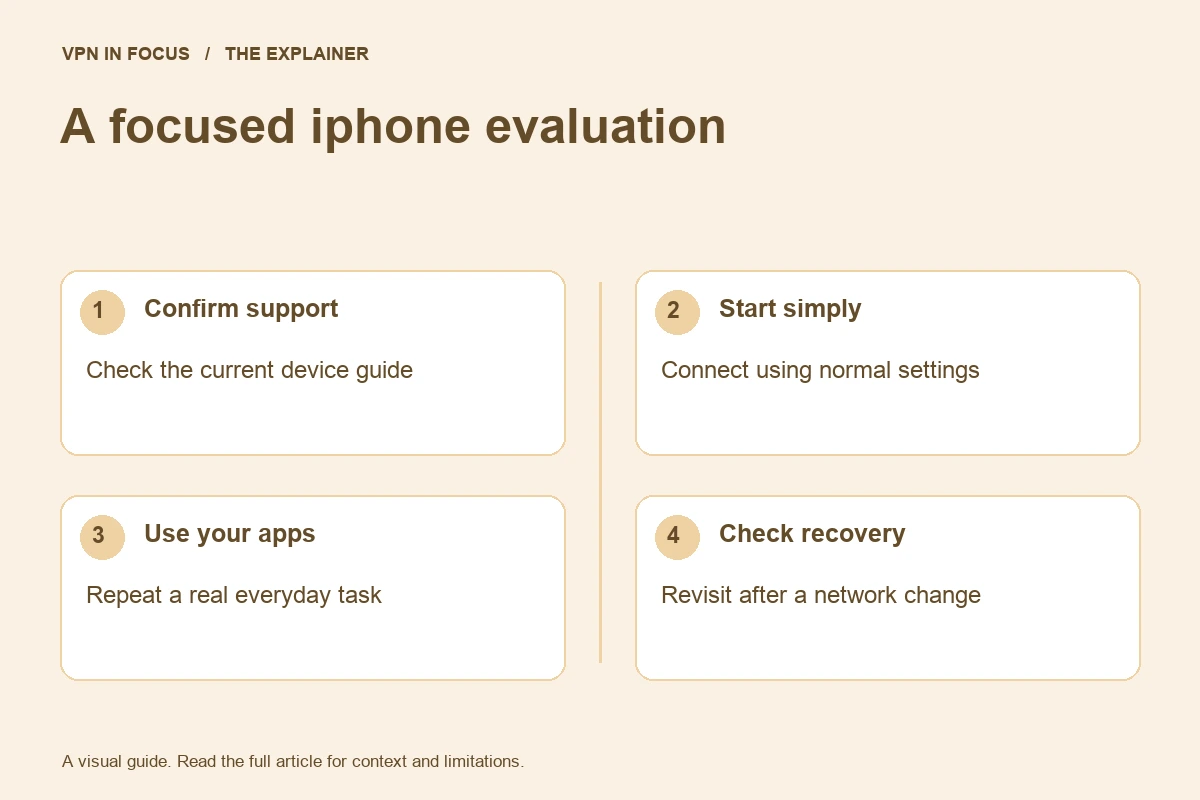
Check reconnection during the journey you actually make. Connect at home, use a normal app, then switch to cellular data and continue the task. Look for stalled connections and understand whether the app is reconnecting. A throughput result on a stationary Wi-Fi network cannot answer this mobility question.
Review the provider’s iOS disconnection protection rather than assuming it matches a desktop kill switch. The operating system controls background execution and network permissions. Keep iOS and the VPN app updated, and revisit the provider’s current guidance if a major update changes behavior.
Battery impact is also contextual. Weak cellular signal, repeated reconnections, video playback and screen brightness can all affect a day’s battery use. Compare similar days and tasks before attributing every difference to the VPN. A simple connection mode is a sensible starting point before adding complex routes.
Compare our iPhone shortlist
| What matters | Proton VPNRead review → | ExpressVPNRead review → | SurfsharkRead review → |
|---|---|---|---|
| Best fit | Transparency & a free plan | Straightforward connections | Multi-device households |
| Simultaneous devices | 10 paid / 1 free | 10 Basic / 12 Advanced / 14 Pro | Unlimited |
| Free plan | Yes — no data cap; restricted locations and features | No permanent free plan | No permanent free plan |
| Connection protocols | WireGuard, OpenVPN, Stealth; platform availability varies | Lightway; other options vary by platform | WireGuard, OpenVPN; IKEv2 on supported apps |
| Multi-hop approach | Secure Core (paid) | No user-configurable multi-hop route | Dynamic MultiHop |
| Blocking tools | NetShield (paid) | Lite / Advanced Protection, depending on plan | CleanWeb; additional security products depend on plan |
| Port forwarding | Paid desktop apps; supported P2P servers | No incoming forwarding on VPN servers | Not offered |
| Refund policy | 30 days on eligible paid purchases; check current terms | 30 days for eligible new users; purchase-channel terms apply | 30 days; eligibility and purchase-channel terms apply |
| Platform coverage | Windows, macOS, Linux, Android, iOS; supported TV apps and routers | Windows, macOS, Linux, Android, iOS; supported TV apps and Aircove routers | Windows, macOS, Linux, Android, iOS; supported TV apps and routers |
| Operating jurisdiction | Switzerland | British Virgin Islands | Netherlands |
| Code transparency | Open-source VPN apps | Lightway is open source; not all app code | Selected components; not all apps |
| Support options | Help center and support requests; live-chat availability varies | 24/7 live chat and help center | Live chat and help center |
| Current plans | View plans | View plans | View plans |
Proton VPN: try the basic connection first
The free plan removes the immediate subscription decision and has no advertised data cap. It restricts locations and advanced capabilities, so it is best evaluated as a basic privacy connection. If your goal is a specific streaming service or a chosen paid location, evaluate the paid plan separately. Do not expect desktop port-forwarding controls on iOS.
ExpressVPN: focus on the connection workflow
Lightway is available on iOS, making ExpressVPN a candidate for people who value a streamlined connection experience. Compare the actual plan: Basic, Advanced and Pro have different simultaneous-device allowances and extras. You do not need the highest tier merely because you own an iPhone.
Surfshark: useful when the phone is one of many devices
Unlimited simultaneous connections make Surfshark convenient for families with multiple phones, tablets and computers. Check the specific iOS Bypasser controls if selective routing matters. A website-based exception and excluding an entire app are not interchangeable promises.
Set it up and check the everyday experience
Use the verified App Store listing reached through the provider’s official website. Install, sign in and approve the VPN configuration prompt for that app. Connect using the recommended mode. Check the app’s current status instead of relying only on whether a VPN symbol happens to appear in the status area.
Test on both Wi-Fi and cellular data. If a hotel or café uses a captive portal, complete the legitimate network sign-in before expecting the tunnel to connect. Re-enable or confirm the VPN afterward. Never install an unfamiliar certificate or management profile simply because a public network tells you it is necessary.
Important limits and common mistakes
iCloud Private Relay and a VPN have different coverage and routing designs. Private Relay is not a universal substitute for a full-device VPN. If you subscribe to iCloud+, read Apple’s explanation and decide which problem you are solving rather than paying for overlapping tools without understanding them.
An App Store subscription may use Apple’s billing and refund process rather than the provider’s direct-purchase process. Keep the receipt and identify where cancellation is managed. Deleting an app does not necessarily cancel its subscription. Review the next renewal date in the account that actually bills you.
How we chose this shortlist
These selections match documented features to the use case: platform support, device allowance, routing controls and subscription flexibility. They are not rankings based on an unpublished laboratory test. Provider documentation was checked on September 24, 2026; availability can change with app versions and plans.
Use the full reviews to inspect the sources and compare trade-offs. Before a long subscription, evaluate your actual setup during the applicable trial or refund period. Record the total upfront charge and renewal terms rather than choosing only by an advertised monthly equivalent.
Frequently asked questions
Can a VPN stop every iPhone app from tracking me?
No. Apps can recognize signed-in accounts and use permissions or identifiers independently of your public IP address. Review app permissions and account settings too.
Should I leave a VPN connected all day?
That depends on your needs and how the connection behaves. Evaluate reliability, battery use and compatibility with your normal apps.
Is a VPN configuration prompt normal?
A legitimate VPN app needs system permission to create a VPN configuration. Verify the app first and avoid unrelated profiles or certificates from unknown sources.
Sources & further reading
Provider statements describe advertised capabilities. They are not independent performance measurements. Sources were consulted while preparing this article on September 24, 2026.
About the author

Alex’s coverage starts with a simple question: what do you actually need a VPN to do? This profile brings together buying guides and service comparisons, with a focus on subscription terms, device compatibility, and useful everyday features.
Alex Morgan is a fictional contributor profile created for this publication. This profile does not represent a verified individual or professional credentials. Read our editorial policy.