 Task-specific server lists
Our take
A guided approach to picking a server for the task at hand.
Who should choose CyberGhost?
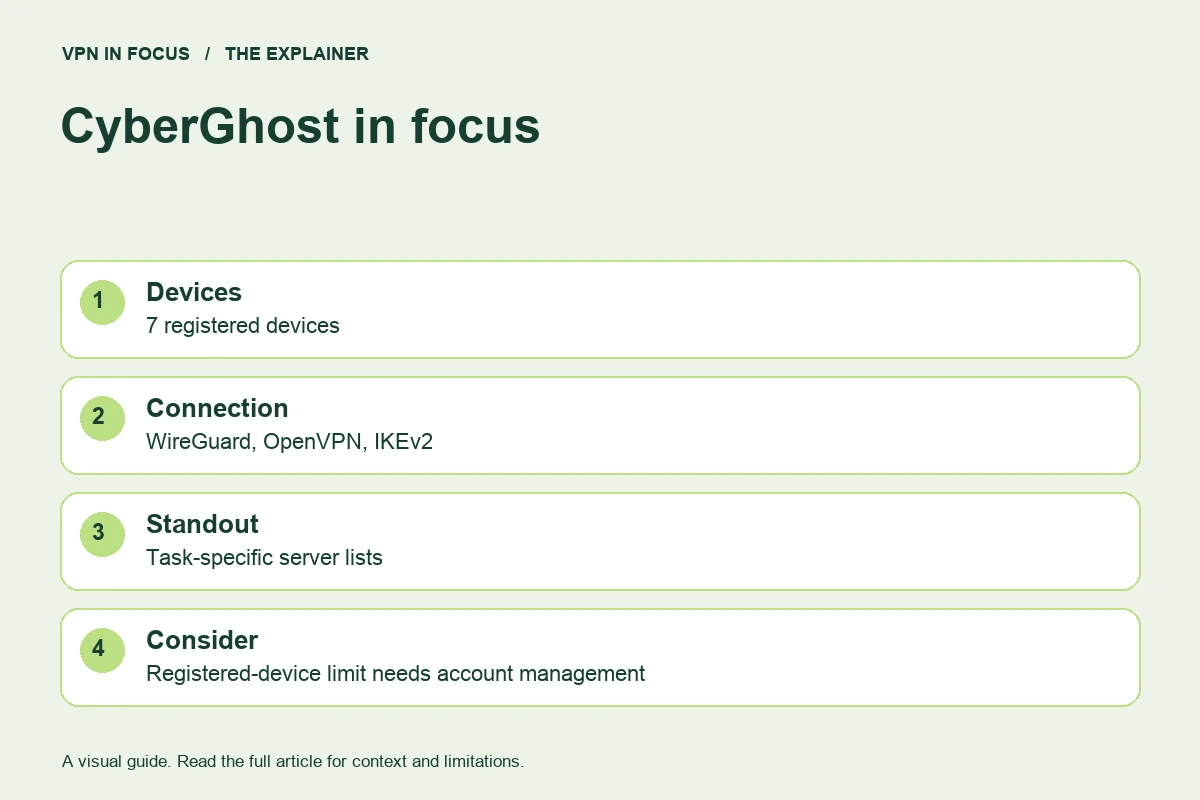
CyberGhost is most interesting for users who prefer a server list organized around a task. Rather than starting with a collection of advanced routing controls, you can explore categories for activities such as streaming or permitted P2P traffic on supported apps. That organization can reduce the effort of finding a suitable first connection.
The subscription covers up to seven registered devices. This is a different management model from simply installing an unlimited number of apps and counting only active connections. If an old device still occupies a slot, you may need to remove it in account management before adding a replacement.
Our take is to consider CyberGhost for a straightforward, guided server-selection experience. Compare another service if you need incoming port forwarding, extensive custom routing or more than seven registered devices. The longer refund period on eligible long subscriptions is useful, but should not be mistaken for a free subscription or applied automatically to a monthly purchase.
What stands out
- Server categories for specific activities
- Longer refund window on eligible long plans
- Seven-device subscription
What to weigh up
- Registered-device limit needs account management
- Shorter refund window on monthly purchases
- Fewer advanced routing options than PIA or Proton
CyberGhost at a glance
| Devices | 7 registered devices |
|---|---|
| Protocols | WireGuard, OpenVPN, IKEv2; platform availability varies |
| Free option | No permanent free plan |
| Port forwarding | Not offered |
| Refund window | 45 days on longer plans / 14 days on monthly; exclusions apply |
| Jurisdiction | Romania |
Prices, plans and renewal terms
CyberGhost’s refund windows are a concrete buying distinction: the cited policy gives 45 days for eligible longer subscriptions and 14 days for a monthly subscription. App Store and iTunes purchases are excluded from the provider’s own money-back guarantee and follow the applicable store process. Read the actual purchase channel before making an evaluation plan.
Compare subscription terms using the total initial payment and the renewal amount. The longest advertised plan may include extra months, so the headline monthly equivalent can be different from the later renewal cost. A dedicated IP or other add-on should be evaluated separately. If your needs are temporary, the flexibility of a shorter commitment may outweigh the lower monthly equivalent of a long plan.
Plan choices at a glance
| Option | Main distinction | Buying consideration |
|---|---|---|
| Monthly | 14-day provider refund window for eligible purchases | More flexibility, a shorter evaluation period |
| Longer subscription | 45-day provider refund window for eligible purchases | Larger commitment; compare the renewal total |
| Optional add-ons | Separate features such as a dedicated IP | Only add a product that solves a specific need |
Example only: a $72 charge covering 24 months is a $3 monthly equivalent, not a $3 monthly payment. If renewal is $90 for 12 months, the later equivalent is $7.50. Use the actual checkout totals, taxes and term lengths for your offer.
Connection features and advanced tools
Activity-specific server categories are CyberGhost’s clearest organizing feature. A streaming label indicates the provider’s intended use for that server, not a permanent guarantee that a third-party streaming service will accept it. A P2P label helps identify an appropriate route for authorized file sharing; it does not change the rights attached to the files.
WireGuard, OpenVPN and IKEv2 are documented connection protocols, with availability depending on the app. The right first choice is usually the current app default or a supported modern protocol. Use an alternative when troubleshooting a specific network, and make one change at a time so that the result is interpretable.
CyberGhost’s content-blocking options and automatic connection settings can simplify daily use, but confirm their exact scope on your device. Domain blocking is not a complete antivirus replacement. Automatic connection also needs to be checked after restart and sleep, particularly when a captive portal or local-network resource is part of your routine.
Privacy, logging and security
CyberGhost publishes a no-logs policy and privacy material. Look for the precise categories of information excluded from activity logging and keep them separate from account or billing records. Read any independent assessment with its date and scope in mind. An audit is evidence about a defined engagement, not a promise that software can never fail.
The service’s Romanian jurisdiction is context, rather than a substitute for evaluating its implementation. Your own location, payment method and the websites you sign into remain relevant. A VPN changes the network path and visible exit address; it does not erase an account identity or make all browser tracking impossible.
Check the kill-switch behavior on the device you will actually use. If the app reconnects after sleep, confirm that the protected application resumes as intended. For local printers or shared storage, understand whether the app permits local-network traffic. A privacy setting that blocks local access may be working as configured.
Speed and connection reliability
A task-labeled server is a starting point, not a measured performance promise. Compare it with a nearby ordinary server if the experience is inconsistent. Distance, network congestion and the local Wi-Fi connection can matter more than the category name.
When testing a streaming setup, observe startup delay, quality changes and interruptions over a normal viewing session. For a game, latency and variation in latency are more relevant than a large download number. Keep the selected location and protocol in your notes so a support agent can reproduce the route more easily.
This is a research-based assessment of documented features and policies. We have not performed a controlled hands-on speed, leak or streaming test for this review. No measured score or pass result is implied. Provider sources and the review date are listed below.
Streaming and viewing on different devices
CyberGhost’s streaming-oriented server lists are a practical reason to shortlist the service. Check whether the relevant category appears in the app for your platform, then verify your own service and device during the applicable refund window. Streaming companies can block shared VPN addresses or apply account-location rules. A provider-maintained list cannot guarantee every event or catalogue indefinitely.
Torrenting and incoming connections
Use the supported P2P server category for files you are authorized to share. CyberGhost does not offer incoming port forwarding. If your application needs that capability, compare PIA or Proton’s supported paid configuration. If it does not, focus on a stable tunnel, appropriate app binding and predictable disconnection behavior.
Apps, compatibility and getting started
CyberGhost supports major desktop and mobile operating systems and documents additional TV, router and other device arrangements. The feature set differs between these routes. Installing a browser extension is not equivalent to routing all applications on the computer through a full VPN app.
Keep the seven-device registration limit in mind when replacing a phone or reinstalling on several machines. Review the account’s device list rather than repeatedly trying to reconnect a new device. For a first setup, establish an ordinary connection, then explore activity-specific lists and automatic rules. This sequence separates account problems from configuration changes.
A focused first-day check
- Install the official app and establish a normal nearby connection.
- Confirm the public exit address and test the applications you actually use.
- Read the kill-switch settings and verify reconnection after sleep or a network change.
- Add one optional feature at a time, recording any intentional routing exception.
- Keep the purchase receipt, renewal date and relevant refund deadline.
Customer support and troubleshooting
The help center and live support are useful for platform-specific questions and device registration. If requesting a refund, give the purchase channel and subscription duration so the correct policy can be applied. Save the request and response. Cancelling an automatic renewal stops a later charge; it does not necessarily create a refund request for the current term.
How it compares with the alternatives
ExpressVPN is worth comparing for a streamlined app and router ecosystem. NordVPN offers a broader set of specialty connection modes. Surfshark is a natural alternative when the seven-device registration limit is restrictive. PIA and Proton VPN are better comparison points when incoming connectivity matters more than activity-labeled server lists.
| What matters | CyberGhostRead review → |  ExpressVPNRead review → ExpressVPNRead review → |  SurfsharkRead review → SurfsharkRead review → |
|---|---|---|---|
| Best fit | Task-specific server lists | Straightforward connections | Multi-device households |
| Simultaneous devices | 7 registered devices | 10 Basic / 12 Advanced / 14 Pro | Unlimited |
| Free plan | No permanent free plan | No permanent free plan | No permanent free plan |
| Connection protocols | WireGuard, OpenVPN, IKEv2; platform availability varies | Lightway; other options vary by platform | WireGuard, OpenVPN; IKEv2 on supported apps |
| Multi-hop approach | Not offered as a standard configurable route | No user-configurable multi-hop route | Dynamic MultiHop |
| Blocking tools | Content Blocker; platform availability varies | Lite / Advanced Protection, depending on plan | CleanWeb; additional security products depend on plan |
| Port forwarding | Not offered | No incoming forwarding on VPN servers | Not offered |
| Refund policy | 45 days on longer plans / 14 days on monthly; exclusions apply | 30 days for eligible new users; purchase-channel terms apply | 30 days; eligibility and purchase-channel terms apply |
| Platform coverage | Windows, macOS, Linux, Android, iOS; supported TV apps and routers | Windows, macOS, Linux, Android, iOS; supported TV apps and Aircove routers | Windows, macOS, Linux, Android, iOS; supported TV apps and routers |
| Operating jurisdiction | Romania | British Virgin Islands | Netherlands |
| Code transparency | Not all apps open source | Lightway is open source; not all app code | Selected components; not all apps |
| Support options | Live chat and help center | 24/7 live chat and help center | Live chat and help center |
| Current plans | View plans | View plans | View plans |
Frequently asked questions
Is CyberGhost’s refund window always 45 days?
No. The cited policy distinguishes eligible longer subscriptions from monthly purchases, which have a 14-day window. Store purchases can follow different rules.
Why can I not add another device?
The subscription uses a registered-device allowance. Check whether an old device still occupies a slot in account management.
Does a streaming server guarantee access?
No. The label describes the provider’s intended use. The streaming service can change access rules or block a VPN exit address.
Check current plans, device support, renewal terms, and cancellation conditions directly with the provider.
Visit CyberGhostSources & further reading
Provider statements describe advertised capabilities. They are not independent performance measurements. Sources were consulted while preparing this article on September 24, 2026.
About the author

Alex’s coverage starts with a simple question: what do you actually need a VPN to do? This profile brings together buying guides and service comparisons, with a focus on subscription terms, device compatibility, and useful everyday features.
Alex Morgan is a fictional contributor profile created for this publication. This profile does not represent a verified individual or professional credentials. Read our editorial policy.