The shortlist: best VPNs for Streaming
The best streaming VPN is the one that works with your actual device, account and permitted viewing setup. A general claim that a VPN “unblocks everything” is not a durable specification. Streaming services change their systems, and an app on a television can behave differently from the same service in a laptop browser.
CyberGhost is a useful starting point for its activity-oriented server lists, ExpressVPN for its app and router ecosystem, and Surfshark for households watching on several devices. These are feature-based candidates, not a promise that every regional library or live event is available. Evaluate the service you actually pay for.

CyberGhost
A guided approach to picking a server for the task at hand.
- Server categories for specific activities
- Longer refund window on eligible long plans

TotalVPN
A straightforward VPN with useful routing controls; check the exact app and renewal terms.
- Guided desktop, mobile and Apple TV setup
- Split-tunneling options on supported apps

ExpressVPN
A streamlined connection experience built around Lightway.
- Lightway available across major platforms
- Dedicated Aircove router option


Surfshark
A flexible subscription for a household full of devices.
- Unlimited simultaneous connections
- Customizable MultiHop routes
TotalVPN: another option to compare
TotalVPN documents Apple TV as well as desktop and mobile setup. That expands its possible role in a living-room setup, but it is not proof that a particular streaming service will remain accessible. Test the actual device, account and region during your applicable evaluation period.
Confirm the device allowance, renewal price and refund process for the offer you choose. Read the detailed TotalVPN review for platform differences and purchase conditions.
What matters most for Streaming
Start with device support. Identify the exact television operating system or streaming-box model, then check whether a native app exists. If it does not, a compatible router may be an option. A router setup affects multiple devices and may introduce its own performance limits, so include its hardware and configuration cost in the decision.
Next, distinguish a VPN from smart DNS. A DNS-based access feature can affect how a service locates or routes you, but it does not provide the encrypted tunnel of a VPN app. Choose it only when its narrower behavior matches your goal.
Finally, look at stability over a viewing session. Startup delay, buffering and changes in picture quality are more useful than a single peak download result. For a live event, test the same device and application in advance; a successful browser session on another device is weak evidence.
Compare our Streaming shortlist
| What matters | CyberGhostRead review → | ExpressVPNRead review → | SurfsharkRead review → |
|---|---|---|---|
| Best fit | Task-specific server lists | Straightforward connections | Multi-device households |
| Simultaneous devices | 7 registered devices | 10 Basic / 12 Advanced / 14 Pro | Unlimited |
| Free plan | No permanent free plan | No permanent free plan | No permanent free plan |
| Connection protocols | WireGuard, OpenVPN, IKEv2; platform availability varies | Lightway; other options vary by platform | WireGuard, OpenVPN; IKEv2 on supported apps |
| Multi-hop approach | Not offered as a standard configurable route | No user-configurable multi-hop route | Dynamic MultiHop |
| Blocking tools | Content Blocker; platform availability varies | Lite / Advanced Protection, depending on plan | CleanWeb; additional security products depend on plan |
| Port forwarding | Not offered | No incoming forwarding on VPN servers | Not offered |
| Refund policy | 45 days on longer plans / 14 days on monthly; exclusions apply | 30 days for eligible new users; purchase-channel terms apply | 30 days; eligibility and purchase-channel terms apply |
| Platform coverage | Windows, macOS, Linux, Android, iOS; supported TV apps and routers | Windows, macOS, Linux, Android, iOS; supported TV apps and Aircove routers | Windows, macOS, Linux, Android, iOS; supported TV apps and routers |
| Operating jurisdiction | Romania | British Virgin Islands | Netherlands |
| Code transparency | Not all apps open source | Lightway is open source; not all app code | Selected components; not all apps |
| Support options | Live chat and help center | 24/7 live chat and help center | Live chat and help center |
| Current plans | View plans | View plans | View plans |
CyberGhost: a clearer server starting point
Its streaming-oriented lists can make initial server selection easier on supported apps. The labels describe the provider’s intended use, not a guarantee from the streaming service. Check the current list, your account region and the applicable refund window; monthly and longer subscriptions have different refund periods.
ExpressVPN: compare the whole device setup
The combination of supported apps and Aircove router hardware gives you several installation routes. Confirm whether you need additional hardware and an ongoing VPN subscription. Its tier-based device allowance matters if several household members use separate apps simultaneously.
Surfshark: many screens under one account
Unlimited simultaneous connections are convenient when phones, laptops and televisions all need supported VPN setups. The household still shares its internet bandwidth. Test one screen first, then add the others to identify whether congestion comes from the local connection or a particular route.
Set it up and check the everyday experience
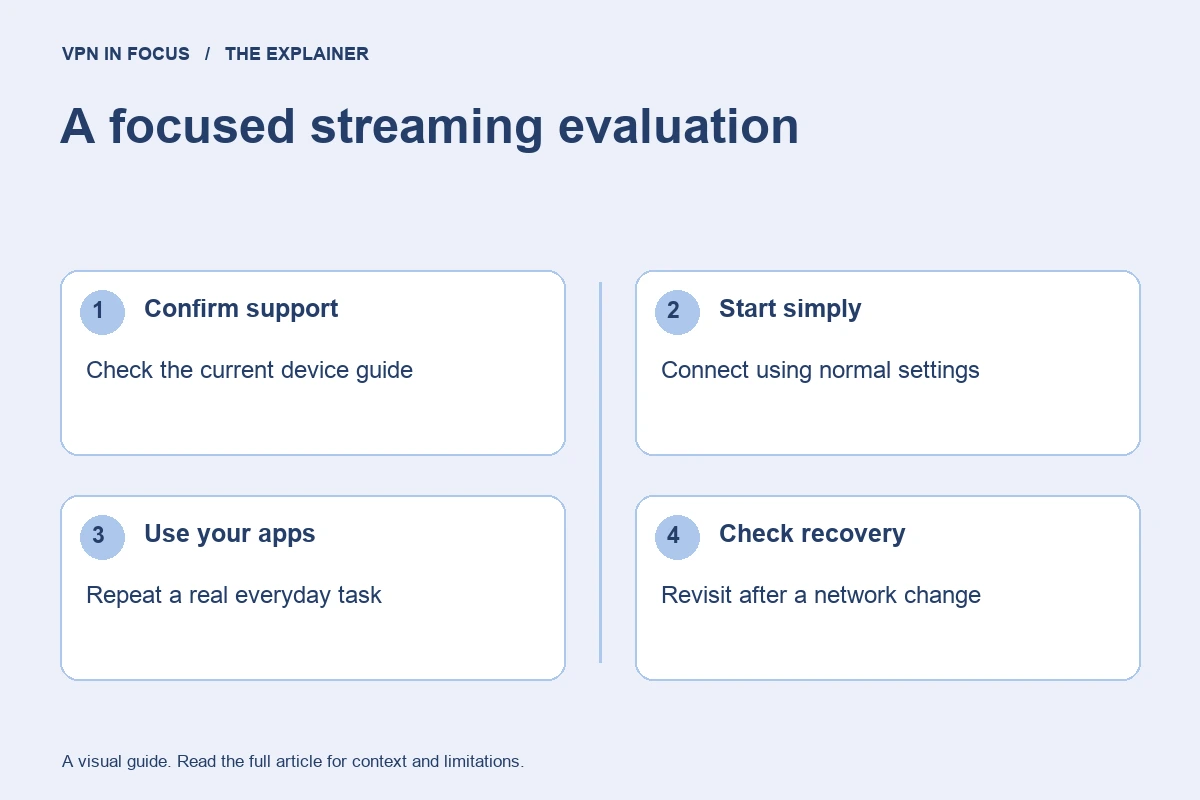
Confirm your streaming subscription and the provider’s current device guide. Install the VPN through the official route, connect to a suitable location and open the streaming application. Follow the streaming service’s terms and regional rules. If access fails, record the error and check the service’s own status before changing settings.
Try one documented alternative route or ask support about the exact device. Avoid repeatedly changing account regions, payment information and network locations at the same time. That makes the cause harder to identify and can trigger account checks. Keep refund deadlines separate from troubleshooting so an evaluation does not unintentionally become a long commitment.
Important limits and common mistakes
A VPN does not grant access to a paid service, replace a subscription or guarantee a particular event. Licensing and account rules remain outside the VPN provider’s control. A review should date any actual access test and identify the device and region; without those details, treat a broad claim cautiously.
For poor quality, inspect the local network too. A television behind a wall on weak Wi-Fi may buffer even when a wired laptop works well. Compare the ordinary connection, a nearby VPN route and the intended route using the same device before drawing a conclusion.
How we chose this shortlist
These selections match documented features to the use case: platform support, device allowance, routing controls and subscription flexibility. They are not rankings based on an unpublished laboratory test. Provider documentation was checked on September 24, 2026; availability can change with app versions and plans.
Use the full reviews to inspect the sources and compare trade-offs. Before a long subscription, evaluate your actual setup during the applicable trial or refund period. Record the total upfront charge and renewal terms rather than choosing only by an advertised monthly equivalent.
Frequently asked questions
Can any VPN guarantee Netflix access forever?
No. Availability can change with the streaming service’s systems, account rules and VPN exit addresses.
Is smart DNS encrypted like a VPN?
No. It is a different network feature and should not be treated as an encrypted VPN tunnel.
Why does streaming work on my laptop but not my TV?
The applications, device support, network connection and account handling may differ. Check the exact television setup rather than assuming the laptop result transfers.
Sources & further reading
Provider statements describe advertised capabilities. They are not independent performance measurements. Sources were consulted while preparing this article on September 24, 2026.
About the author

Alex’s coverage starts with a simple question: what do you actually need a VPN to do? This profile brings together buying guides and service comparisons, with a focus on subscription terms, device compatibility, and useful everyday features.
Alex Morgan is a fictional contributor profile created for this publication. This profile does not represent a verified individual or professional credentials. Read our editorial policy.