The shortlist: best VPNs for Android
Android gives VPN users useful system-level networking controls, but phone manufacturers and software versions can change where those controls appear. The best choice is therefore a combination of a suitable app and settings that work reliably on your device. A feature-rich subscription is poor value if aggressive battery management keeps interrupting the connection.
Start with Surfshark for multi-device coverage and routing flexibility, NordVPN for a broad connection toolkit, or Proton VPN for its free entry point and open-source apps. Compare the exact Android build and installation route. Sideloading a modified VPN app from an unknown source defeats the trust decision you are trying to make.

Surfshark
A flexible subscription for a household full of devices.
- Unlimited simultaneous connections
- Customizable MultiHop routes

TotalVPN
A straightforward VPN with useful routing controls; check the exact app and renewal terms.
- Guided desktop, mobile and Apple TV setup
- Split-tunneling options on supported apps

NordVPN
A versatile starting point for everyday VPN use.
- Ten simultaneous connections
- NordLynx and specialty connection modes


Proton VPN
An accessible free starting point, with deeper privacy tools on paid plans.
- A usable free plan without a data cap
- Open-source apps and published audits
TotalVPN: another option to compare
TotalVPN documents application exclusions and always-on settings on Android. Check the scope of an exclusion and whether battery management interferes with reconnecting. If you change the protocol, verify that the intended routing rules still work.
Confirm the device allowance, renewal price and refund process for the offer you choose. Read the detailed TotalVPN review for platform differences and purchase conditions.
What matters most for Android
Android can provide always-on VPN and, where supported, a control to block connections without the VPN. These settings are distinct from an app’s own connection toggle. Read Google’s guidance and the provider’s instructions for your version, then test how the combination behaves after restart and network changes.
Battery optimization can affect background applications. If a VPN disconnects repeatedly, review the device manufacturer’s power-management settings and the provider’s recommended configuration. Change only what is necessary for that app, and verify the result. A broad system-wide exception is rarely the first troubleshooting step.
Split tunneling is useful when a particular app needs a direct connection, but it creates an intentional exception. Keep track of which apps bypass the tunnel and why. An always-on blocking setting may interact with those exceptions, so test the actual combination instead of treating each toggle in isolation.
Compare our Android shortlist
| What matters | SurfsharkRead review → | NordVPNRead review → | Proton VPNRead review → |
|---|---|---|---|
| Best fit | Multi-device households | Everyday features | Transparency & a free plan |
| Simultaneous devices | Unlimited | 10 | 10 paid / 1 free |
| Free plan | No permanent free plan | No permanent free plan | Yes — no data cap; restricted locations and features |
| Connection protocols | WireGuard, OpenVPN; IKEv2 on supported apps | NordLynx, OpenVPN; NordWhisper on supported apps | WireGuard, OpenVPN, Stealth; platform availability varies |
| Multi-hop approach | Dynamic MultiHop | Double VPN | Secure Core (paid) |
| Blocking tools | CleanWeb; additional security products depend on plan | Threat Protection; features vary by plan and platform | NetShield (paid) |
| Port forwarding | Not offered | Not offered | Paid desktop apps; supported P2P servers |
| Refund policy | 30 days; eligibility and purchase-channel terms apply | 30 days; eligibility and purchase-channel terms apply | 30 days on eligible paid purchases; check current terms |
| Platform coverage | Windows, macOS, Linux, Android, iOS; supported TV apps and routers | Windows, macOS, Linux, Android, iOS; supported TV apps and routers | Windows, macOS, Linux, Android, iOS; supported TV apps and routers |
| Operating jurisdiction | Netherlands | Panama | Switzerland |
| Code transparency | Selected components; not all apps | Selected components; not all apps | Open-source VPN apps |
| Support options | Live chat and help center | Live chat and help center | Help center and support requests; live-chat availability varies |
| Current plans | View plans | View plans | View plans |
Surfshark: flexible coverage for many devices
The unlimited simultaneous allowance makes sense when your Android phone shares a subscription with several other devices. Bypasser can help with specific routing needs on supported apps. Start without exceptions, establish a working connection and then add only the exclusions needed for your routine.
NordVPN: room to explore connection options
NordVPN provides a broad set of connection features, with a ten-device allowance. Start with the recommended protocol and a nearby route. Specialty modes serve particular purposes; enabling every advanced option at once is not a reliable way to improve security or speed.
Proton VPN: a free baseline with a paid upgrade path
Proton Free lets you evaluate a basic connection without a data cap, within its location and feature restrictions. Open-source apps add transparency. The paid plan should be assessed separately if your requirement is a chosen country, streaming support or additional privacy features.
Set it up and check the everyday experience
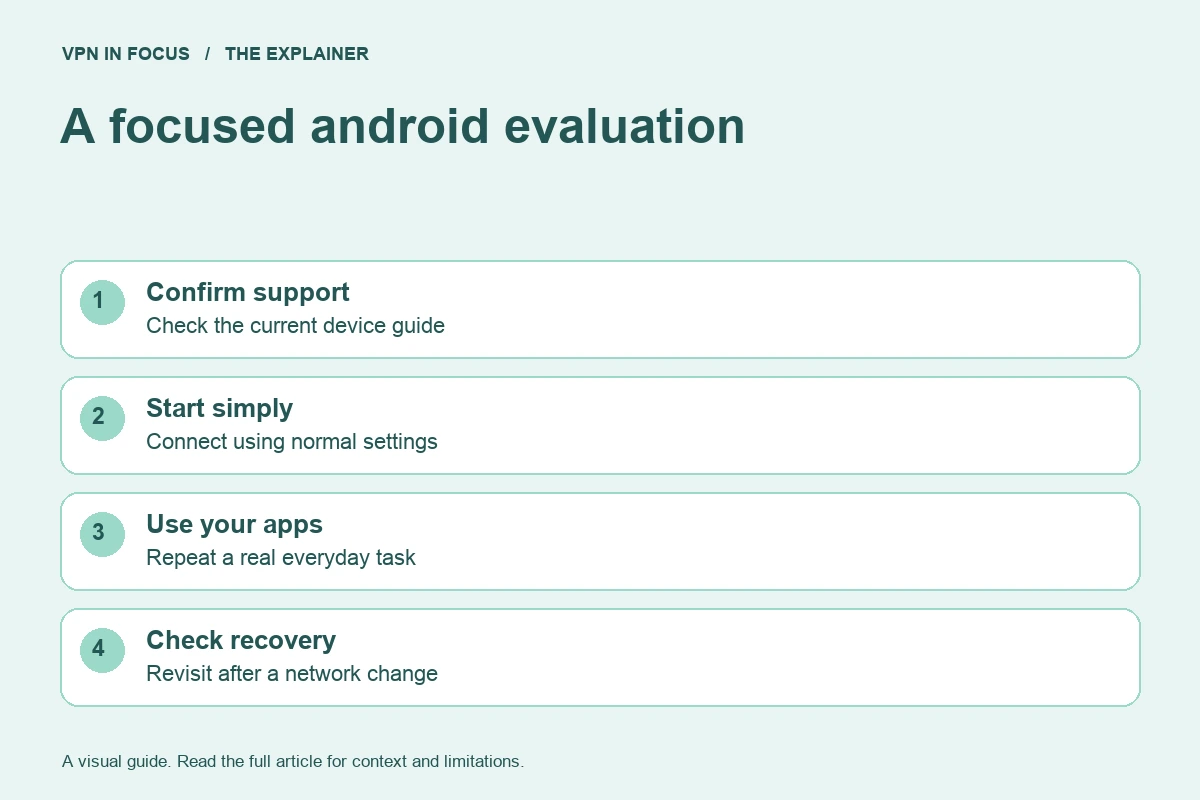
Follow the provider’s official link to its verified store listing. Check the developer name, install the app and approve the VPN permission. Android may warn that the VPN can observe network traffic; that is a reason to choose the provider carefully, not to install an unknown app with a more reassuring advertisement.
Connect normally, confirm ordinary browsing, then review always-on and blocking options if you need them. Restart the phone and repeat the check. Move from Wi-Fi to cellular data, test an app you use regularly and inspect the current VPN status. Document any split-tunnel exceptions before forgetting why they were added.
Important limits and common mistakes
Android work profiles, managed devices and enterprise VPNs can introduce separate rules. Do not assume a personal VPN can override your employer’s policy or route a managed application the way you expect. A work administrator should confirm the supported arrangement.
Custom DNS settings, ad-blocking apps and VPN-based firewalls can also compete for network control. If two apps both need the operating system’s VPN slot, they may not run together in the way their names suggest. Read each product’s documentation before combining them, and test one configuration at a time.
How we chose this shortlist
These selections match documented features to the use case: platform support, device allowance, routing controls and subscription flexibility. They are not rankings based on an unpublished laboratory test. Provider documentation was checked on September 24, 2026; availability can change with app versions and plans.
Use the full reviews to inspect the sources and compare trade-offs. Before a long subscription, evaluate your actual setup during the applicable trial or refund period. Record the total upfront charge and renewal terms rather than choosing only by an advertised monthly equivalent.
Frequently asked questions
Where is always-on VPN on Android?
Its location depends on Android version and manufacturer. Start in the system VPN settings and consult Google’s or your device maker’s current instructions.
Why does my VPN stop in the background?
Possible causes include power management, network transitions or app settings. Check the current provider guide and change one variable at a time.
Can I use a VPN and a VPN-based ad blocker together?
Not necessarily. Products that both rely on Android’s VPN facility can conflict. Check their documented compatibility instead of assuming both are active.
Sources & further reading
Provider statements describe advertised capabilities. They are not independent performance measurements. Sources were consulted while preparing this article on September 24, 2026.
About the author

Alex’s coverage starts with a simple question: what do you actually need a VPN to do? This profile brings together buying guides and service comparisons, with a focus on subscription terms, device compatibility, and useful everyday features.
Alex Morgan is a fictional contributor profile created for this publication. This profile does not represent a verified individual or professional credentials. Read our editorial policy.